

Reading data from Excel in Power Apps and Power Automate can be a major pain point for many companies. Default connectors often fail with larger files, processing records for tens of seconds (or longer). Fortunately, there’s a solution: a custom Excel script that generates a JSON file and seamlessly integrates with Power Apps and Power Automate. The fast Excel row reading in Power Apps approach I’ll show you speeds up massive data imports by up to 10 times and allows you to retrieve 30,000 rows in just a few seconds. Sound good? Read on!
Why is standard Excel data reading so slow?
The problem is simple: standard Power Apps and Power Automate connectors process data row by row. Transferring individual records, batch limits, and complex queries make bulk imports take a long time and burden the entire application. Especially with files containing thousands of rows, this results in frustrating waiting times, timeouts, and errors.
What’s the optimal solution?
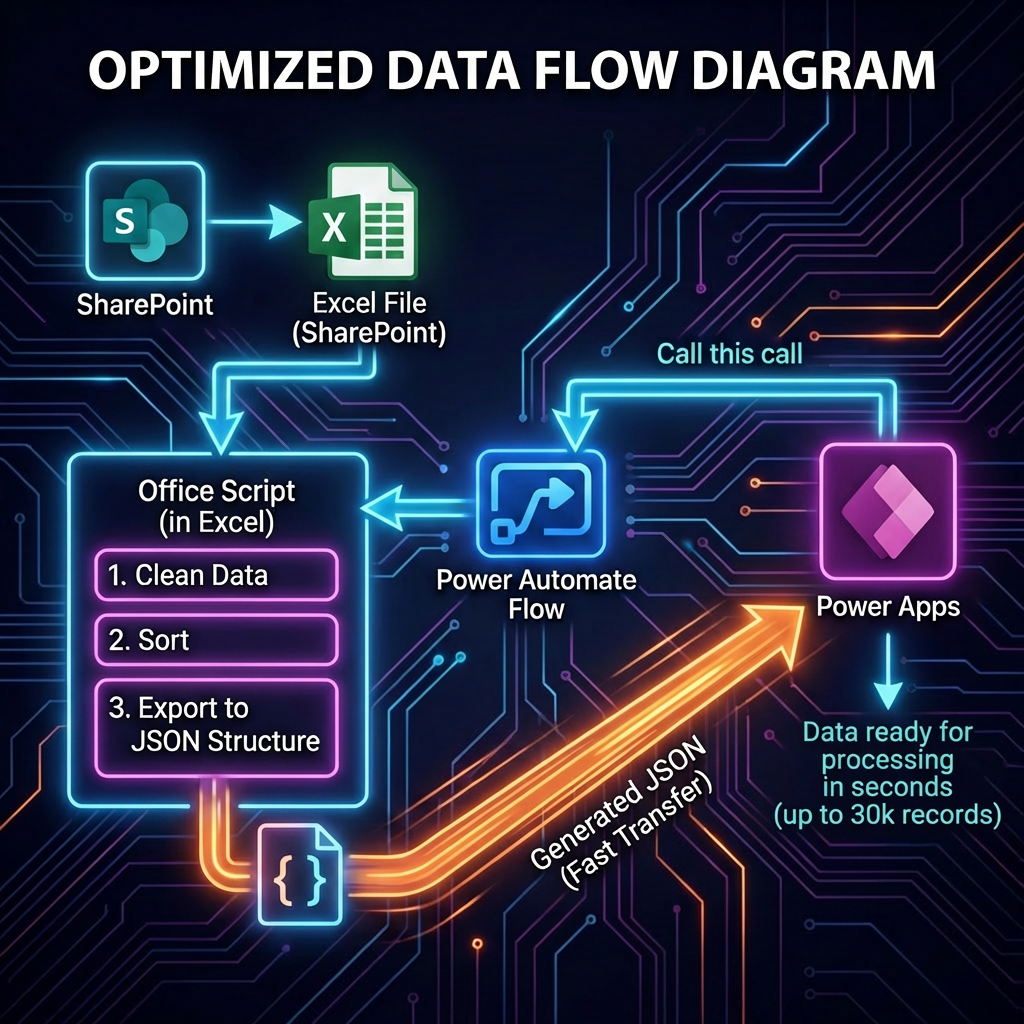
The secret lies in an Office Script that:
- automatically aggregates selected data from the entire file,
- exports it in bulk to JSON format,
- returns one ready-made file to Power Apps or Power Automate.
Thanks to this, the number of requests sent to Excel drops to virtually zero. A single retrieval is enough and the entire dataset (even hundreds of thousands of records) is immediately available in the application.
How does it work step by step?
- Creating an Office Script in Excel
You write a script that cleans, sorts, and exports data in the appropriate structure to JSON. - Adding a Power Automate Flow
Power Automate calls the Excel script from a file stored on SharePoint. In response, you get a ready-made JSON with data. - Integration with Power Apps
Power Apps calls the Flow from Power Automate. The entire export process takes a few seconds, and the data is available at once in the application, ready for processing.
This architecture eliminates typical limitations and provides up to a tenfold speed increase.
When is it worth implementing?
- Are you analyzing large datasets (e.g., customer lists, orders)?
- Do you need full automation without manual work?
- Do you need rapid prototyping of applications for business data?
- Do you want to read thousands or tens of thousands of records in bulk without the risk of timeouts?
If the answer is “yes,” this technique is perfect for you.
Summary
Fast Excel row reading in Power Apps isn’t just about better performance. It’s also about stability, reliable integration, and scalability, even for really large files. Using a simple Excel script, you export the entire file with one click, eliminate problems with limits, and drastically reduce the time it takes to deliver data to business applications.
Want to implement bulk Excel import in your organization? Increase your team’s efficiency today!
Contact me if you’re interested in a ready-made script or support with implementation!
- Fast Excel Row Reading in Power Apps: 10x Faster Data Retrieval for Up to 30,000 Records
- Implementing No Code Solutions with Microsoft – Efficient Backoffice Process Automation
- How Does a Modern Workflow Look with AI Foundry in 2026?
- Quick Answer: What Does Power Automate Free License Offer?
- Power Automate- Co to jest? Jak automatyzować pracę BackOffice